> ## Documentation Index
> Fetch the complete documentation index at: https://hub.agentr.global/llms.txt
> Use this file to discover all available pages before exploring further.

# Automated Pre-screening

> Automatically filter applicants based on qualification criteria before shortlisting.

# ⚙️ Resume Screening on Autopilot

The Automated Pre-screening feature helps streamline your recruitment workflow by combining resume analysis and intelligent candidate interaction, so only qualified, relevant applicants make it to your review stage.

***

## 🔍 What It Does

Automatically screens candidates right after they apply, by:

* Analyzing resumes
* Matching them with the Job Description (JD)
* Initiating a dynamic chat to evaluate skills and intent
* Generating a comprehensive candidate report

***

## 🛠 How It Works

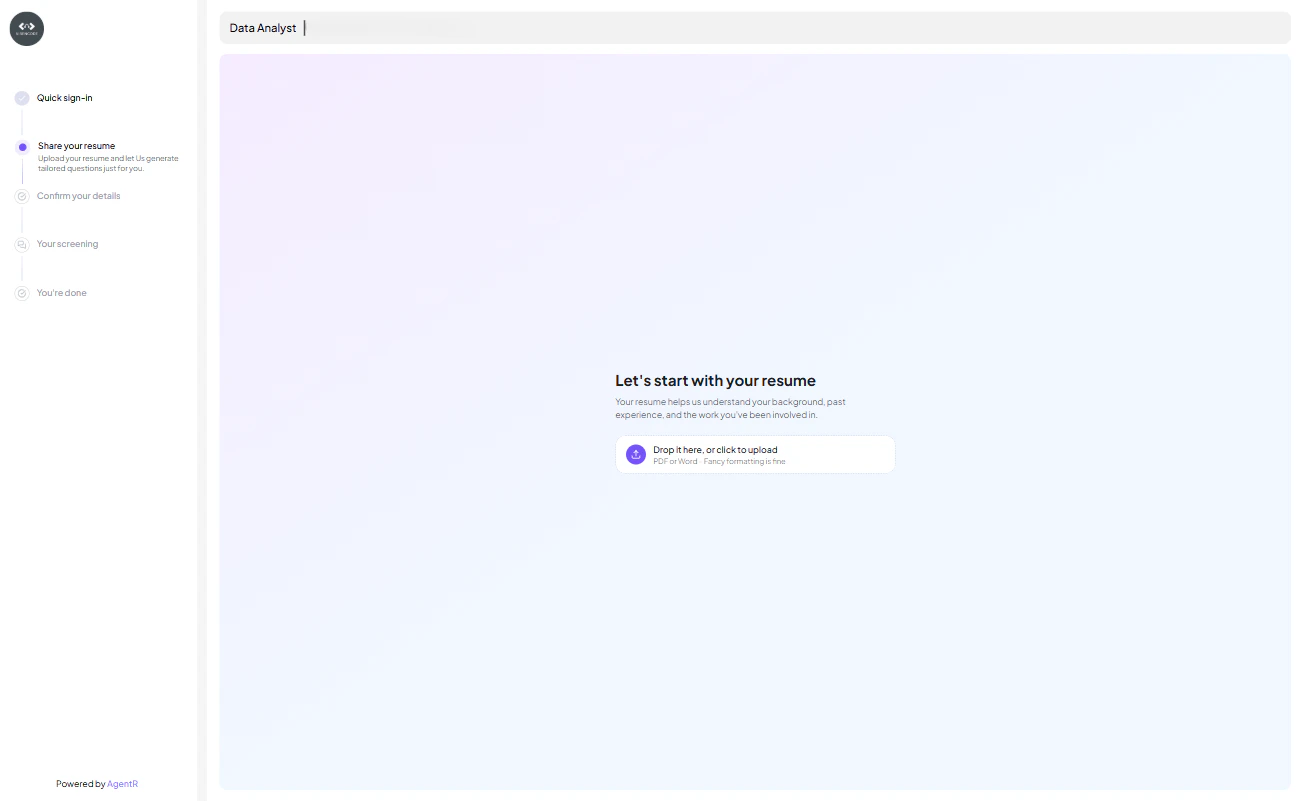
### 1. Resume Upload

Once a candidate applies, they are prompted to upload their resume.

<div style={{ textAlign: 'center' }}>
  <img src="https://mintcdn.com/agentr-309534c0/-ol_TTgDZ2EEAm93/images/upload_resume.png?fit=max&auto=format&n=-ol_TTgDZ2EEAm93&q=85&s=e7d9565f6787f1210caa4fff24535903" alt="Resume Upload" width="600" data-path="images/upload_resume.png" />
</div>

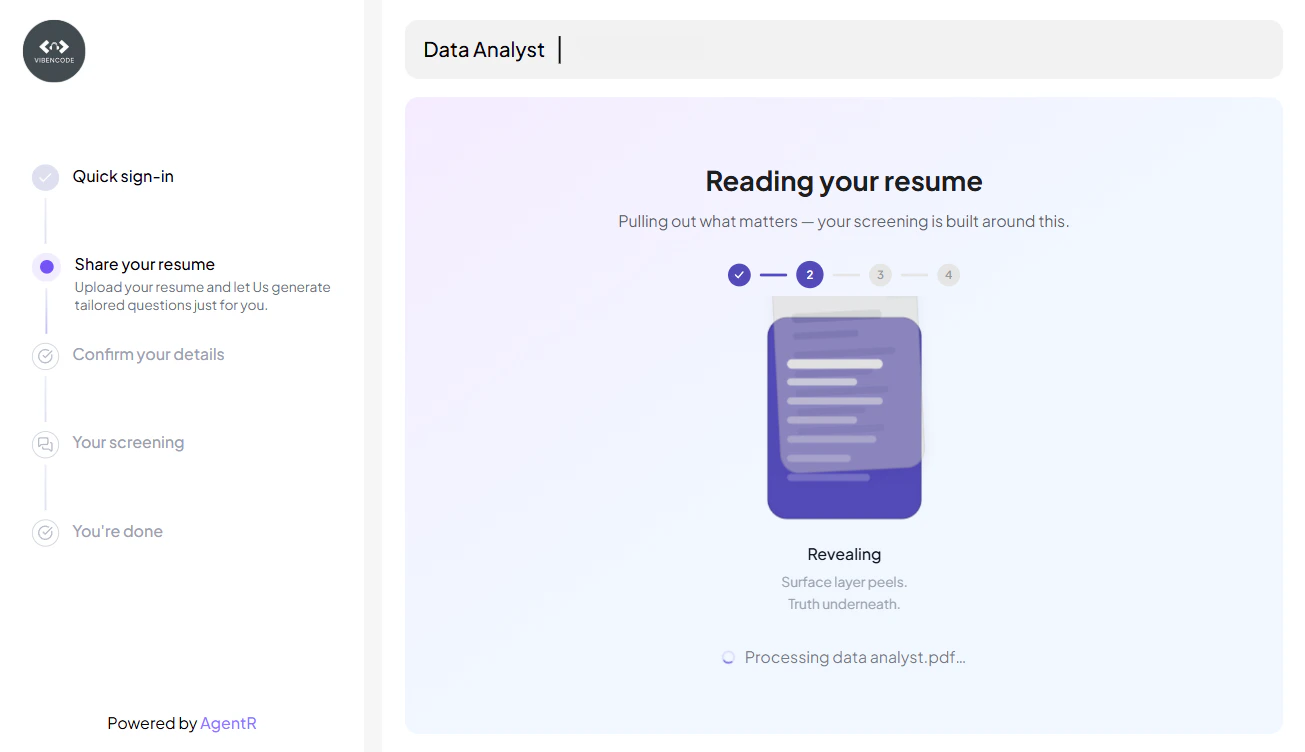
### 2. Resume & JD Matching

The platform’s AI engine scans the resume and matches it against the job-specific criteria such as:

* Experience
* Skills
* Location
* Education

<div style={{ textAlign: 'center' }}>
  <img src="https://mintcdn.com/agentr-309534c0/-ol_TTgDZ2EEAm93/images/resume_analyse.png?fit=max&auto=format&n=-ol_TTgDZ2EEAm93&q=85&s=b771a09e710e409f29a9e968be41935e" width="600" data-path="images/resume_analyse.png" />
</div>

### 3. Intelligent Chat Screening

Once the resume is uploaded, a chat session is triggered automatically to assess the candidate.

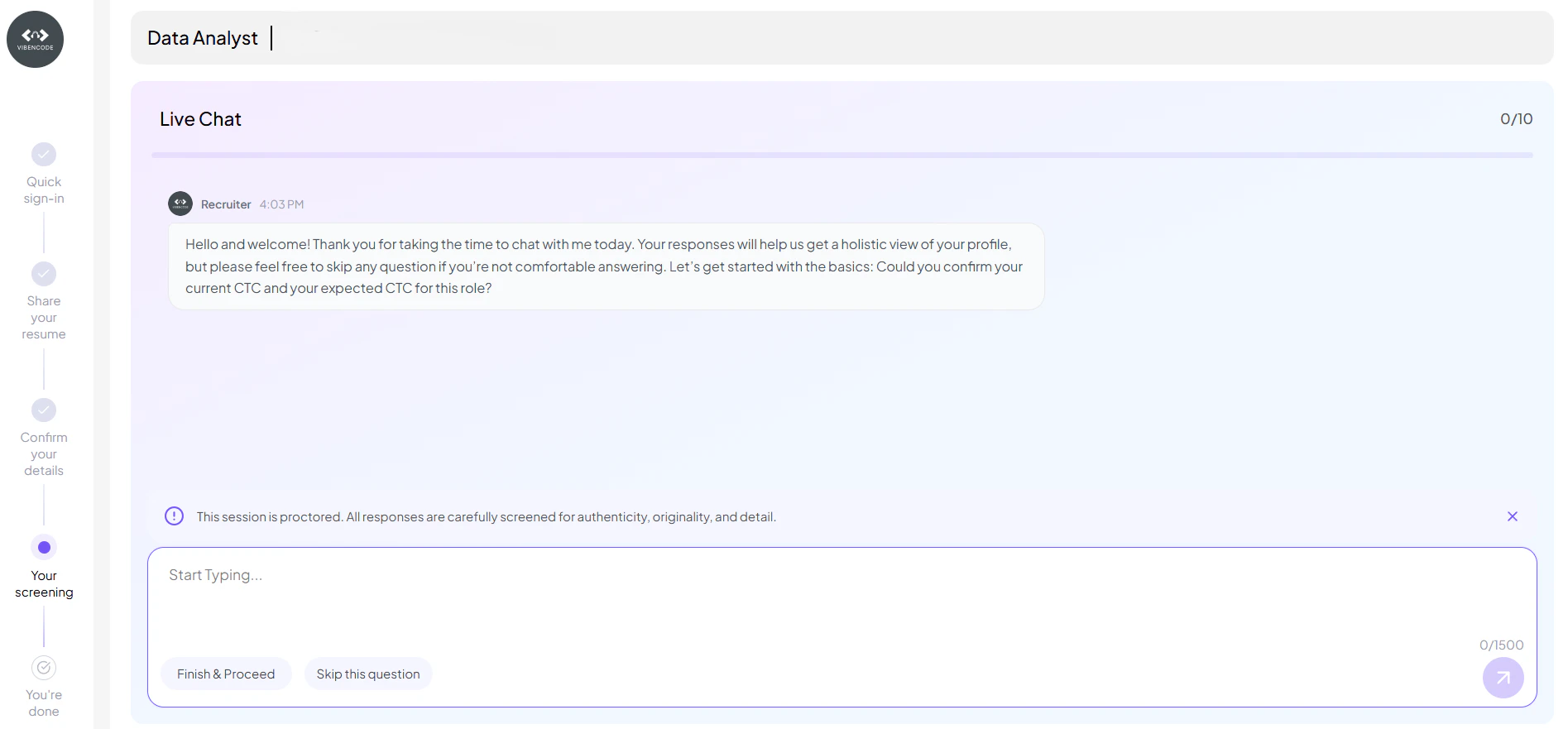
The virtual assistant asks maximum 10 contextual questions, including:

* 1–3 HR questions (e.g., notice period, preferred location, expected CTC)
* 6–9 technical or domain-specific questions based on the job description
* Custom screening questions added by the recruiter to tailor the evaluation

<div style={{ textAlign: 'center' }}>
  <img src="https://mintcdn.com/agentr-309534c0/-ol_TTgDZ2EEAm93/images/resume_screen.png?fit=max&auto=format&n=-ol_TTgDZ2EEAm93&q=85&s=dfe5330acac0ef289f754daeea70c1c4" width="600" data-path="images/resume_screen.png" />
</div>

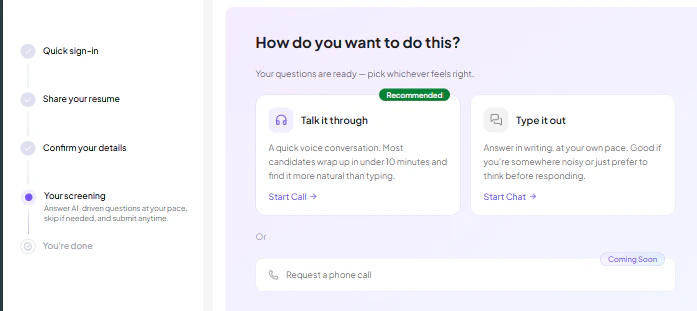
Candidates can choose how they want to complete the screening:

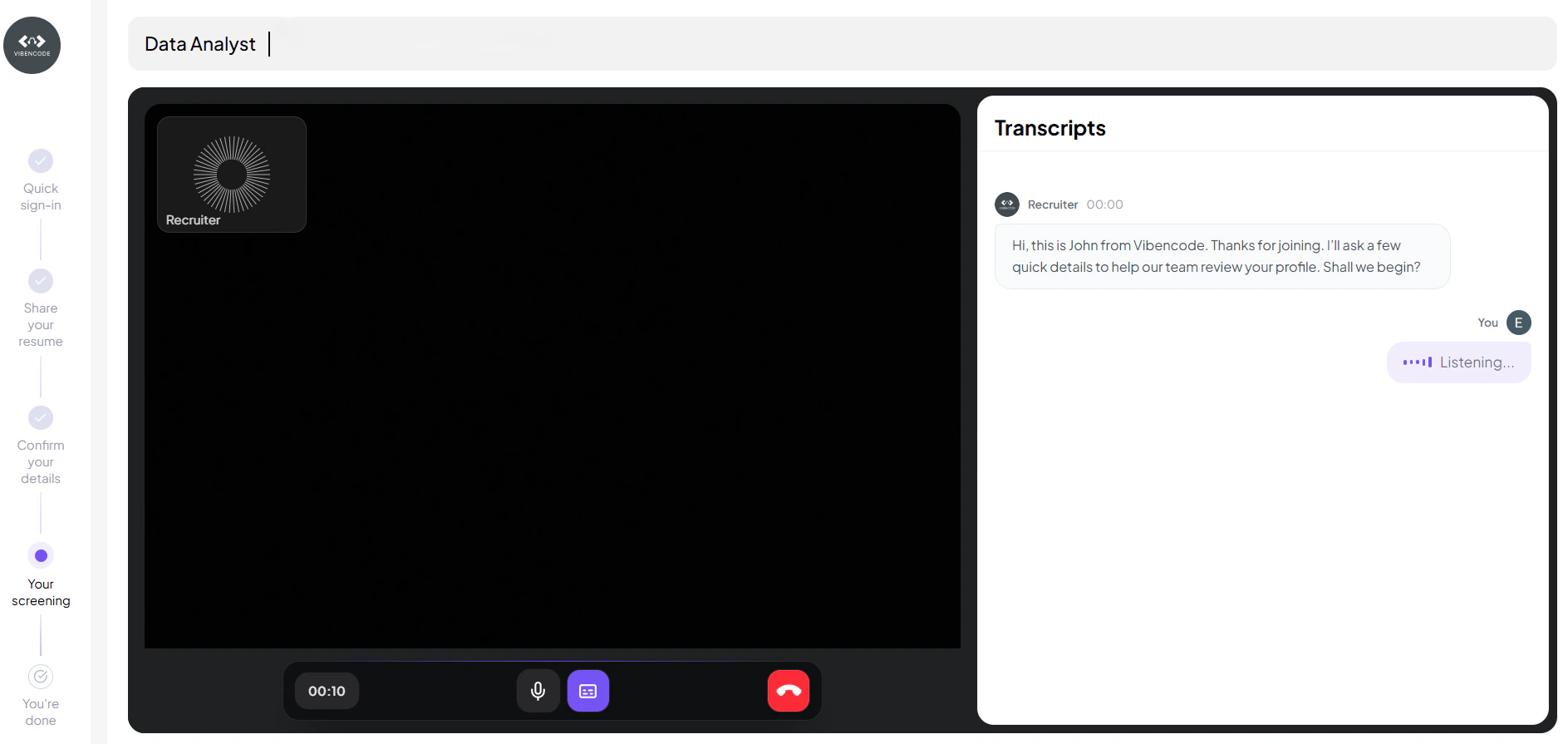
* **Talk it through** – A voice-based interaction where candidates answer questions naturally through a quick conversation

<div style={{ textAlign: 'center' }}>
  <img src="https://mintcdn.com/agentr-309534c0/-ol_TTgDZ2EEAm93/images/talk_it_through.png?fit=max&auto=format&n=-ol_TTgDZ2EEAm93&q=85&s=1dbce2d5b57471ae8fd194e273c92c28" width="600" data-path="images/talk_it_through.png" />
</div>

* **Type it out** – A chat-based interaction that allows candidates to respond at their own pace

<div style={{ textAlign: 'center' }}>
  <img src="https://mintcdn.com/agentr-309534c0/-ol_TTgDZ2EEAm93/images/type_it_out.png?fit=max&auto=format&n=-ol_TTgDZ2EEAm93&q=85&s=65b041946971c8cc4ad9370878befa02" width="600" data-path="images/type_it_out.png" />
</div>

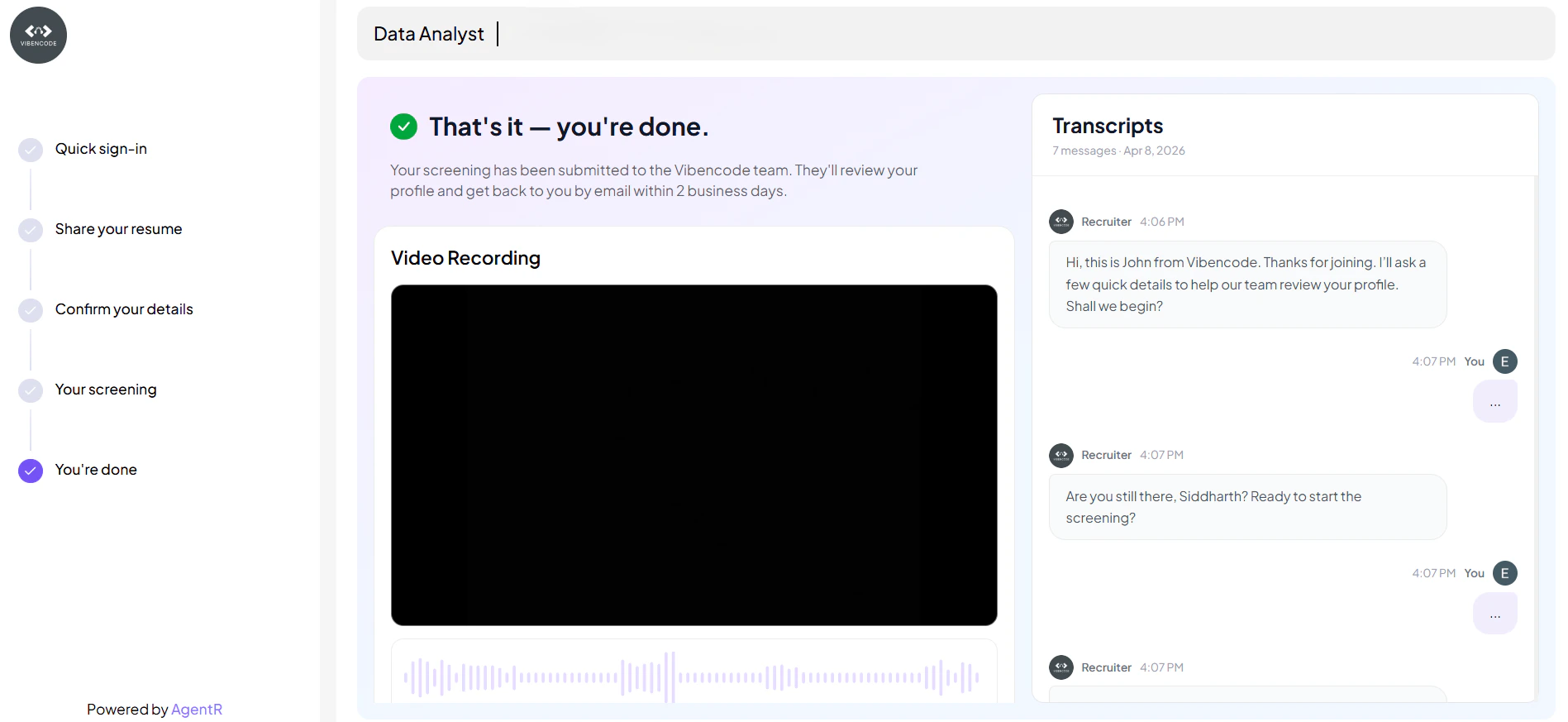
### 4. You're All Set!

Once the screening is completed, candidates reach the final stage confirming successful submission.

At this stage:

* The screening process is **fully completed and submitted**
* Candidate receive a confirmation message that their profile is under review
* Candidate can access:
  * **Interaction history** for detailed responses
  * **Recorded sessions** (where applicable)

<div style={{ textAlign: 'center' }}>
  <img src="https://mintcdn.com/agentr-309534c0/-ol_TTgDZ2EEAm93/images/you_are_done.png?fit=max&auto=format&n=-ol_TTgDZ2EEAm93&q=85&s=d7ff3ff0e2f56cf398977f19ef443ce7" width="600" data-path="images/you_are_done.png" />
</div>

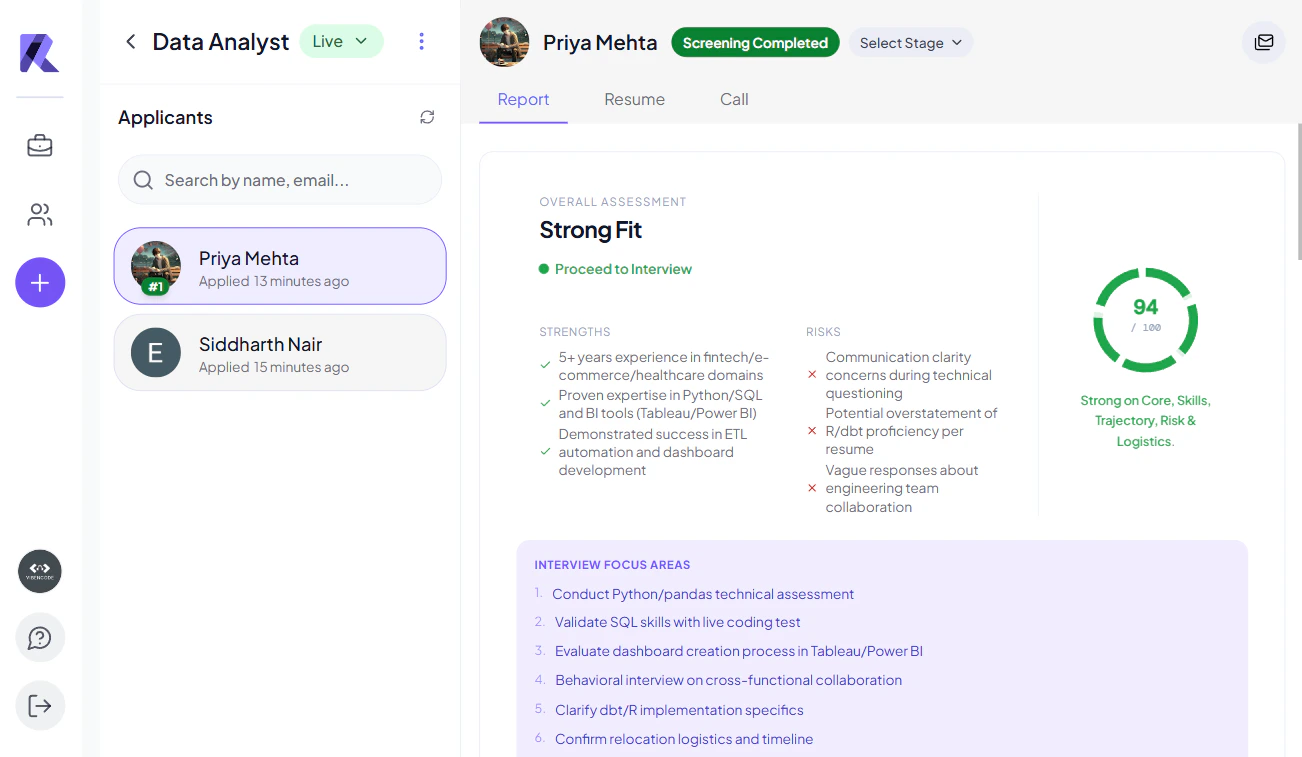
### 5. Report Generation

Based on:

* Resume match results
* Chat responses

The system generates a **pre-screening report** to help you identify the most relevant candidates.

<div style={{ textAlign: 'center' }}>
  <img src="https://mintcdn.com/agentr-309534c0/-ol_TTgDZ2EEAm93/images/screen_report.png?fit=max&auto=format&n=-ol_TTgDZ2EEAm93&q=85&s=ffa9cbb5158fd27ca2c3e16a9d7076f5" width="600" data-path="images/screen_report.png" />
</div>

***

## 🧾 Candidate Status Stages

<table>
  <thead>
    <tr className="text-lg">
      <th>Status</th>
      <th>What It Means</th>
    </tr>
  </thead>

  <tbody>
    <tr>
      <td style={{ verticalAlign: 'middle', textAlign: 'center' }}>
        <img src="https://mintcdn.com/agentr-309534c0/WsjyIbnP8ttcBHzs/images/completed.svg?fit=max&auto=format&n=WsjyIbnP8ttcBHzs&q=85&s=0b1553b3576cf579511fa2d42d98825f" alt="Resume Processing" width="99" height="26" data-path="images/completed.svg" />
      </td>

      <td style={{ verticalAlign: 'middle' }}>
        Resume upload is in progress and being processed by the system.
      </td>
    </tr>

    <tr>
      <td style={{ verticalAlign: 'middle', textAlign: 'center' }}>
        <img src="https://mintcdn.com/agentr-309534c0/WsjyIbnP8ttcBHzs/images/screening.svg?fit=max&auto=format&n=WsjyIbnP8ttcBHzs&q=85&s=eab0119b59c92e6008d48e1bc0c10c44" alt="Resume Parsed" width="99" height="26" data-path="images/screening.svg" />
      </td>

      <td style={{ verticalAlign: 'middle' }}>
        Resume has been successfully parsed and key details have been extracted.
      </td>
    </tr>

    <tr>
      <td style={{ verticalAlign: 'middle', textAlign: 'center' }}>
        <img src="https://mintcdn.com/agentr-309534c0/WsjyIbnP8ttcBHzs/images/processing.svg?fit=max&auto=format&n=WsjyIbnP8ttcBHzs&q=85&s=2f17c253629fc2e3d42d42cafa4f5a3c" alt="Resume Processed" width="99" height="26" data-path="images/processing.svg" />
      </td>

      <td style={{ verticalAlign: 'middle' }}>
        Resume analysis is complete and candidate is ready for screening.
      </td>
    </tr>

    <tr>
      <td style={{ verticalAlign: 'middle', textAlign: 'center' }}>
        <img src="https://mintcdn.com/agentr-309534c0/WsjyIbnP8ttcBHzs/images/not-uploaded.svg?fit=max&auto=format&n=WsjyIbnP8ttcBHzs&q=85&s=e8b77bf4109e0a767757e2560c1cfd33" alt="Screening Ready" width="99" height="26" data-path="images/not-uploaded.svg" />
      </td>

      <td style={{ verticalAlign: 'middle' }}>
        Candidate is eligible and ready to begin the screening session.
      </td>
    </tr>

    <tr>
      <td style={{ verticalAlign: 'middle', textAlign: 'center' }}>
        <img src="https://mintcdn.com/agentr-309534c0/WsjyIbnP8ttcBHzs/images/screening.svg?fit=max&auto=format&n=WsjyIbnP8ttcBHzs&q=85&s=eab0119b59c92e6008d48e1bc0c10c44" alt="Screening Started" width="99" height="26" data-path="images/screening.svg" />
      </td>

      <td style={{ verticalAlign: 'middle' }}>
        Candidate has started the screening interaction.
      </td>
    </tr>

    <tr>
      <td style={{ verticalAlign: 'middle', textAlign: 'center' }}>
        <img src="https://mintcdn.com/agentr-309534c0/WsjyIbnP8ttcBHzs/images/screening.svg?fit=max&auto=format&n=WsjyIbnP8ttcBHzs&q=85&s=eab0119b59c92e6008d48e1bc0c10c44" alt="Screening Completed" width="99" height="26" data-path="images/screening.svg" />
      </td>

      <td style={{ verticalAlign: 'middle' }}>
        Screening is completed and evaluation report has been generated.
      </td>
    </tr>

    <tr>
      <td style={{ verticalAlign: 'middle', textAlign: 'center' }}>
        <img src="https://mintcdn.com/agentr-309534c0/WsjyIbnP8ttcBHzs/images/screening.svg?fit=max&auto=format&n=WsjyIbnP8ttcBHzs&q=85&s=eab0119b59c92e6008d48e1bc0c10c44" alt="Screening Skipped" width="99" height="26" data-path="images/screening.svg" />
      </td>

      <td style={{ verticalAlign: 'middle' }}>
        Candidate skipped the screening process.
      </td>
    </tr>

    <tr>
      <td style={{ verticalAlign: 'middle', textAlign: 'center' }}>
        <img src="https://mintcdn.com/agentr-309534c0/WsjyIbnP8ttcBHzs/images/screening.svg?fit=max&auto=format&n=WsjyIbnP8ttcBHzs&q=85&s=eab0119b59c92e6008d48e1bc0c10c44" alt="Screening Failed" width="99" height="26" data-path="images/screening.svg" />
      </td>

      <td style={{ verticalAlign: 'middle' }}>
        Screening could not be completed due to an error or invalid attempt.
      </td>
    </tr>

    <tr>
      <td style={{ verticalAlign: 'middle', textAlign: 'center' }}>
        <img src="https://mintcdn.com/agentr-309534c0/WsjyIbnP8ttcBHzs/images/screening.svg?fit=max&auto=format&n=WsjyIbnP8ttcBHzs&q=85&s=eab0119b59c92e6008d48e1bc0c10c44" alt="Retry Allowed" width="99" height="26" data-path="images/screening.svg" />
      </td>

      <td style={{ verticalAlign: 'middle' }}>
        Candidate can retry the screening after a failed or incomplete attempt.
      </td>
    </tr>

    <tr>
      <td style={{ verticalAlign: 'middle', textAlign: 'center' }}>
        <img src="https://mintcdn.com/agentr-309534c0/WsjyIbnP8ttcBHzs/images/screening.svg?fit=max&auto=format&n=WsjyIbnP8ttcBHzs&q=85&s=eab0119b59c92e6008d48e1bc0c10c44" alt="Screening Timeout" width="99" height="26" data-path="images/screening.svg" />
      </td>

      <td style={{ verticalAlign: 'middle' }}>
        Screening session expired due to inactivity or time limit.
      </td>
    </tr>
  </tbody>
</table>

## 🖥️ Recruiter Dashboard View

You can easily manage and review candidates from the dashboard with multiple filtering and action options:

* **All Applicants** → View every candidate in one place
* **Pre-screened Applicants** → Focus on AI-evaluated candidates
* **Applicants by Status** → Track candidates based on stages like **Screening Completed** etc.

<div style={{ textAlign: 'center' }}>
  <img src="https://mintcdn.com/agentr-309534c0/-ol_TTgDZ2EEAm93/images/recruiter_dashboard.png?fit=max&auto=format&n=-ol_TTgDZ2EEAm93&q=85&s=8859ed55ef20d96f7a187487d039950e" width="600" data-path="images/recruiter_dashboard.png" />
</div>

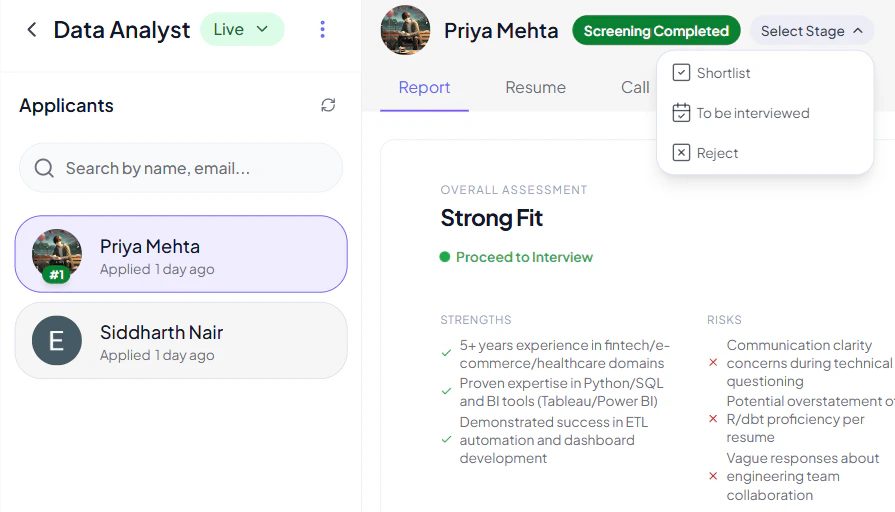
### 🎯 Update Candidate Stage

Recruiters can also take quick actions on each candidate:

* Use the **"Select Stage" dropdown** to update candidate status
* Move candidates to:
  * **Shortlist**
  * **To be Interviewed**
  * **Reject**

> 💡 This helps streamline decision-making and keeps your hiring pipeline organized.

***

> 🚀 Especially powerful when managing high-volume applications, as it reduces manual effort and improves workflow efficiency.

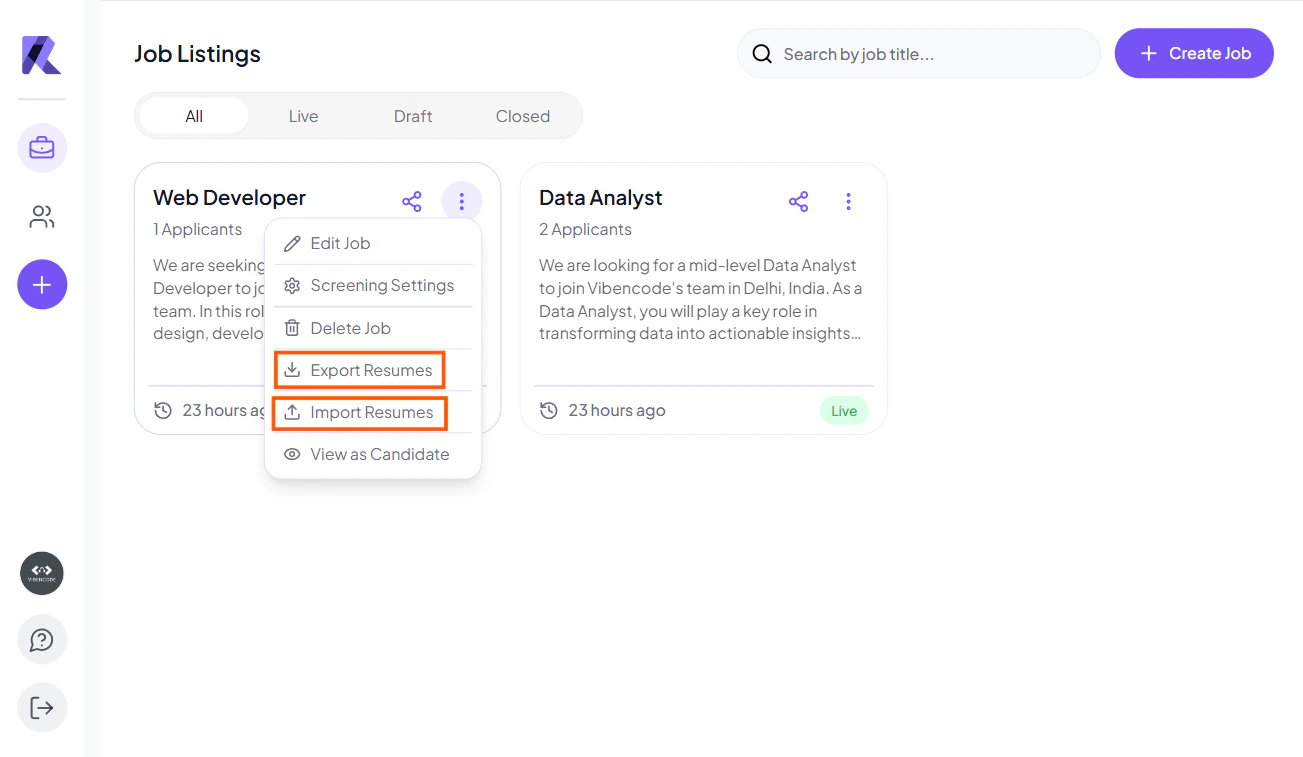
## 📥 Bulk Resume Import & Candidate Sharing

Recruiters can efficiently manage candidates by importing resumes in bulk and sharing candidate details:

<div style={{ textAlign: 'center' }}>
  <img src="https://mintcdn.com/agentr-309534c0/-ol_TTgDZ2EEAm93/images/resume_import.png?fit=max&auto=format&n=-ol_TTgDZ2EEAm93&q=85&s=4359e40186ee8765ac50ce6df38ac271" width="600" data-path="images/resume_import.png" />
</div>

### Bulk Resume Import

* Click on the **(⋯) three dots menu** on a job post
* Select the **Import Resumes** option
* Upload multiple candidate resumes in bulk

> 🚀 This helps quickly add large numbers of candidates without manual entry, saving time and effort.

### Export & Share Candidate Details

* Export necessary candidate files with resume
* Send them directly to candidates via email
* Useful for collaboration and external review processes

> 📩 This makes it easy to manage, share, and review candidate information outside the platform.

***

## ✅ Benefits

* Saves significant recruiter time by automating resume screening and initial candidate interactions
* Reduces bias through consistent, AI-driven evaluation of all applicants
* Improves candidate match quality by filtering only relevant profiles
* Enables faster hiring decisions with structured insights and clear candidate data
* Supports bulk actions like resume import and candidate sharing for better efficiency
* Enhances collaboration by allowing easy export and sharing of candidate information